Introduction
Breaking News - A major technological innovation to make BIM easily accessible on construction sites and enrich the digital model without changing work habits
The problem of BIM on construction sites
Although already widely implemented in the design phases, BIM still struggles to become widespread during the construction phase. There are several reasons for this:
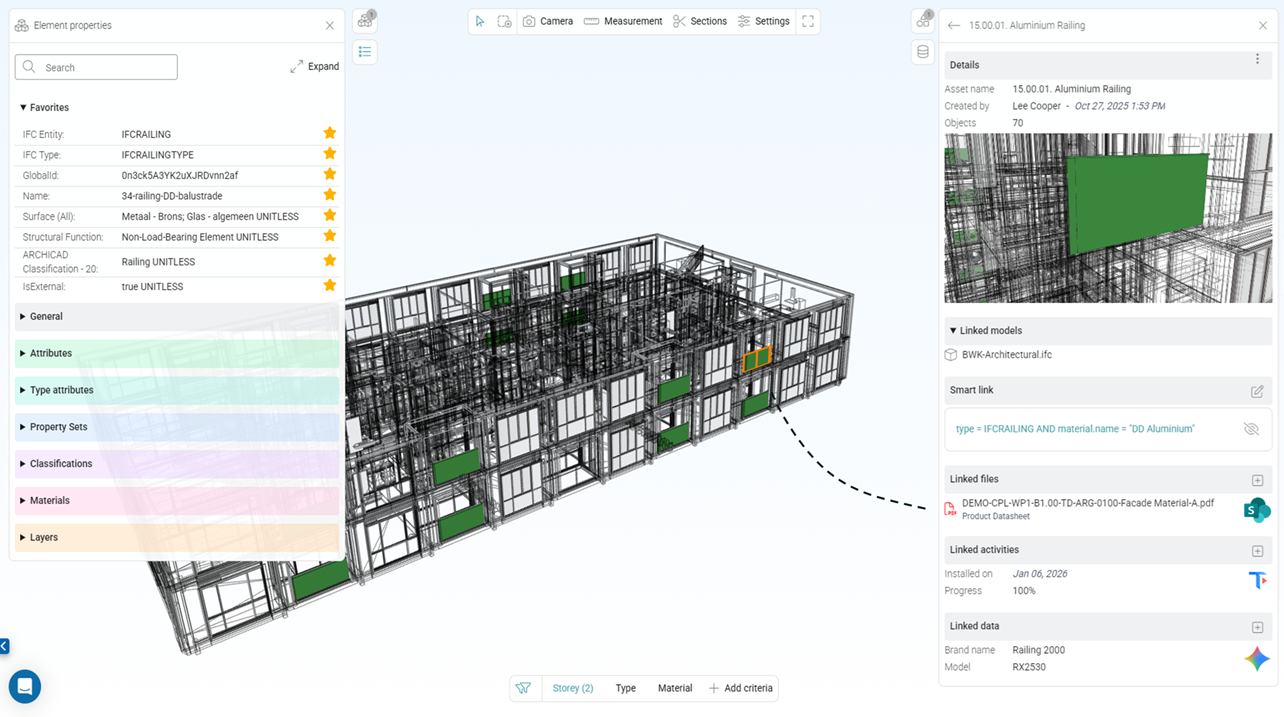
- BIM viewers exhibit variable performance, particularly with large models and less powerful computers.
- While the modeling is carried out by specialized personnel, much of the information and documentation comes from the construction site, where the workers are experts in their field, but not in BIM.
- The amount of information explodes. Data entry is mostly manual, which discourages even the most motivated.
Bridging the gap between the construction site and BIM
This is the mission Cooperlink set for itself three years ago when it launched a research project. The question was how to bridge the technological gap and the specific expertise gap in BIM.
The findings of our research project showed that it was necessary to address BIM without changing work habits. This was the most effective way to enable rapid and intelligent adoption of the technology. While site managers and engineers are now accustomed to classifying and enriching documents using metadata (a process increasingly facilitated by the introduction of AI), Cooperlink decided to work in this direction.
The asset (equipment) as a pivotal element
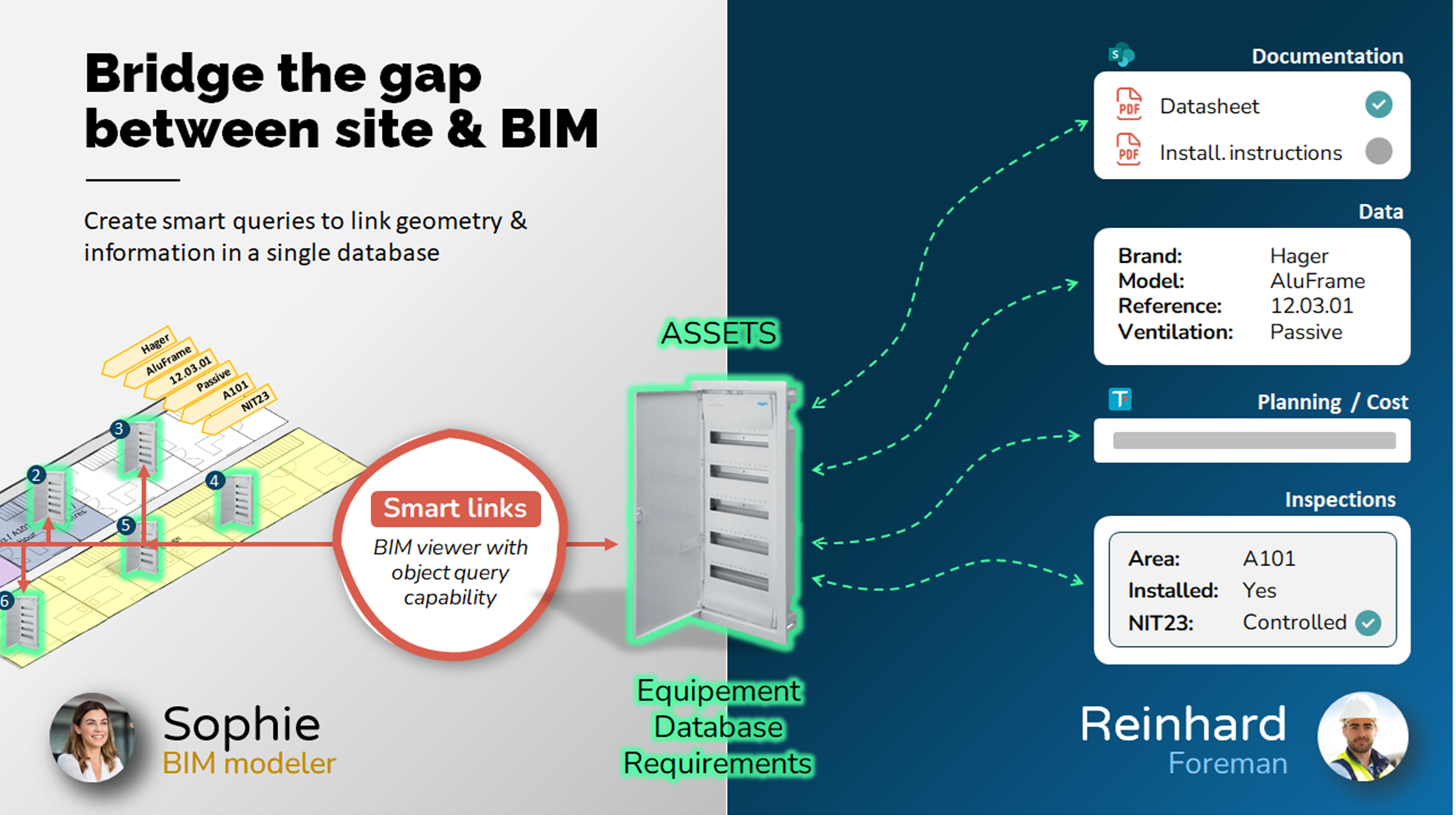
In practical terms, the solution developed by Cooperlink consists of establishing a list of the project's assets (equipment, but not only). Generally, users will opt for references to the design or operational specifications.
Acting as a bridge between the construction site and BIM, Cooperlink allows non-BIM experts to enrich the model without changing their workflow, and prepare the building for use with minimal effort. For example, brand, model, and technical specifications are automatically associated with objects in the model. The result? A data-rich, usable, and cost-effective BIM model.

The BIM team has tools to automatically link these assets to BIM objects using Cooperlink's BIM-as-a-Database and BIM Query Language technologies. The BIM modeler can easily establish a protocol for linking the building's assets to the digital model.
On the other side, the construction team can enrich the assets with the documentation and information they have available (product data, schedule, cost, inspection reports, etc.) without needing any BIM expertise. For them, it's simply a matter of working in the same way they would on a collaborative document management system or in an Excel table.
A user experience designed for simplicity!
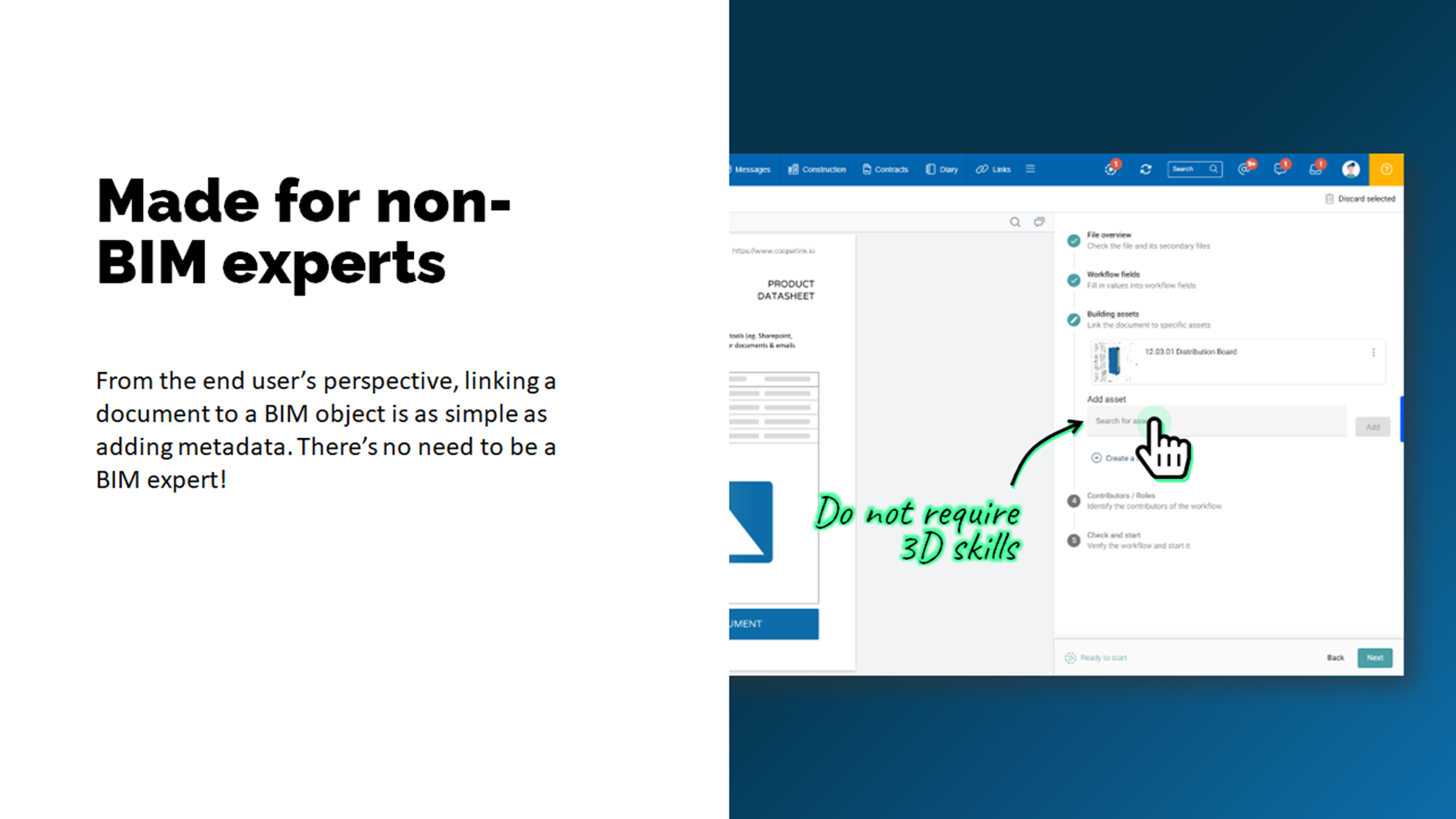
In practice, Cooperlink has worked on the simplest possible user experience. For the site manager, enriching the digital model is as simple as choosing a value from a list. One click and it's done.
As illustrated below from the Document Management perspective, when the site manager submits a document from SharePoint for approval, he simply needs to enter the specification reference/code. Cooperlink automatically links this document to the corresponding asset, and therefore to the objects in the BIM model.
Thanks to the smart linking system, when the BIM model is revised, Cooperlink automatically recalculates the links between objects, documents on SharePoint, and information (data).
BIM Viewer - Smart & Interactive
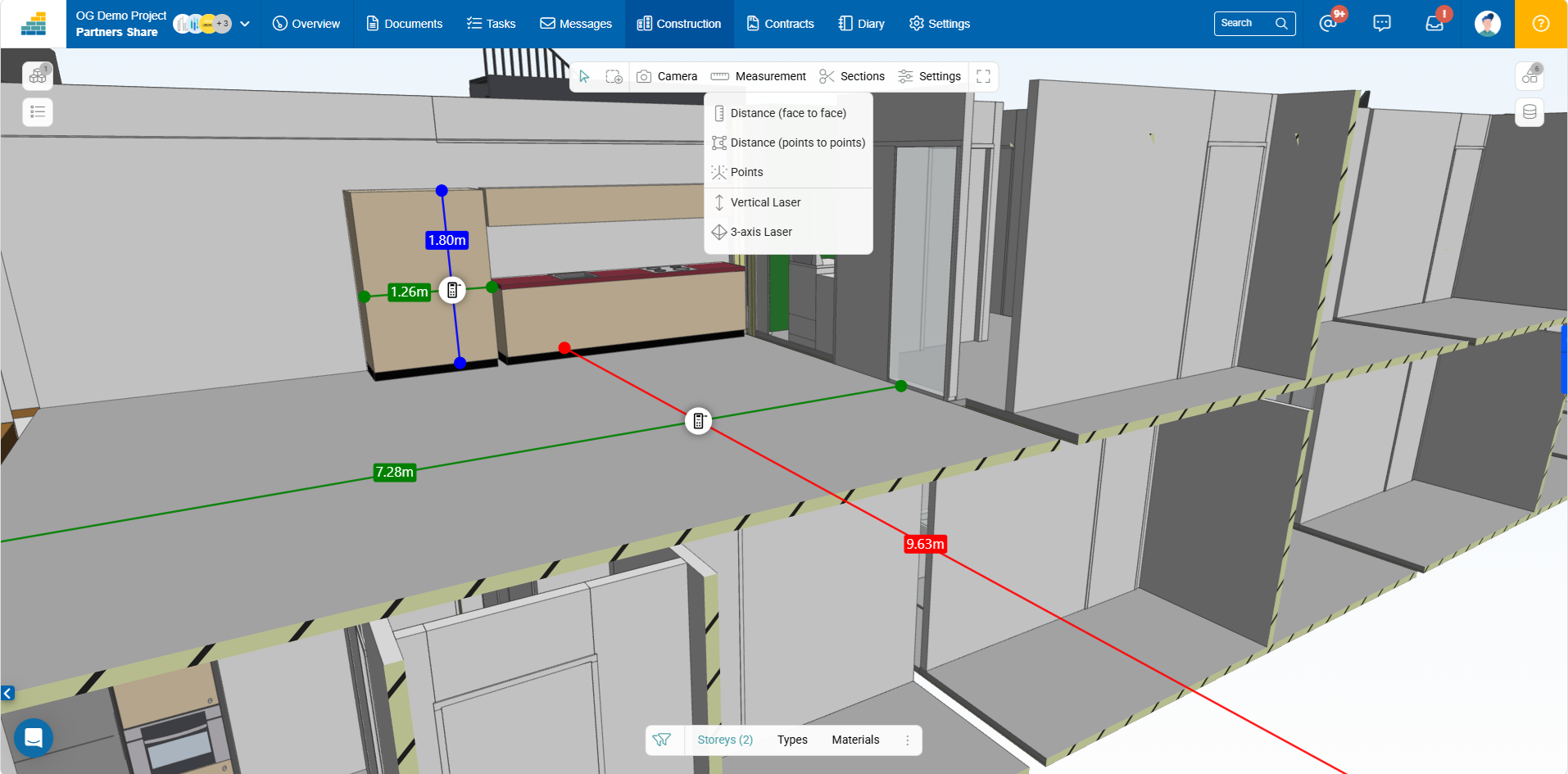
Cooperlink's BIM viewer is fluid even with large models and includes the following features:
- Federated model mode (one or more 3D files)
- Simple and multiple selections
- Object properties with favorites option
- Sections and boxes
- Simple and advanced filters
- Colorization
- Measurements
The workspace owner chooses which models can be shared and with which partners.
In the coming months, the viewer will be enhanced with the ability to display 2D plans alongside the 3D view, or as section plans. It will also be possible to create observations (BCF).
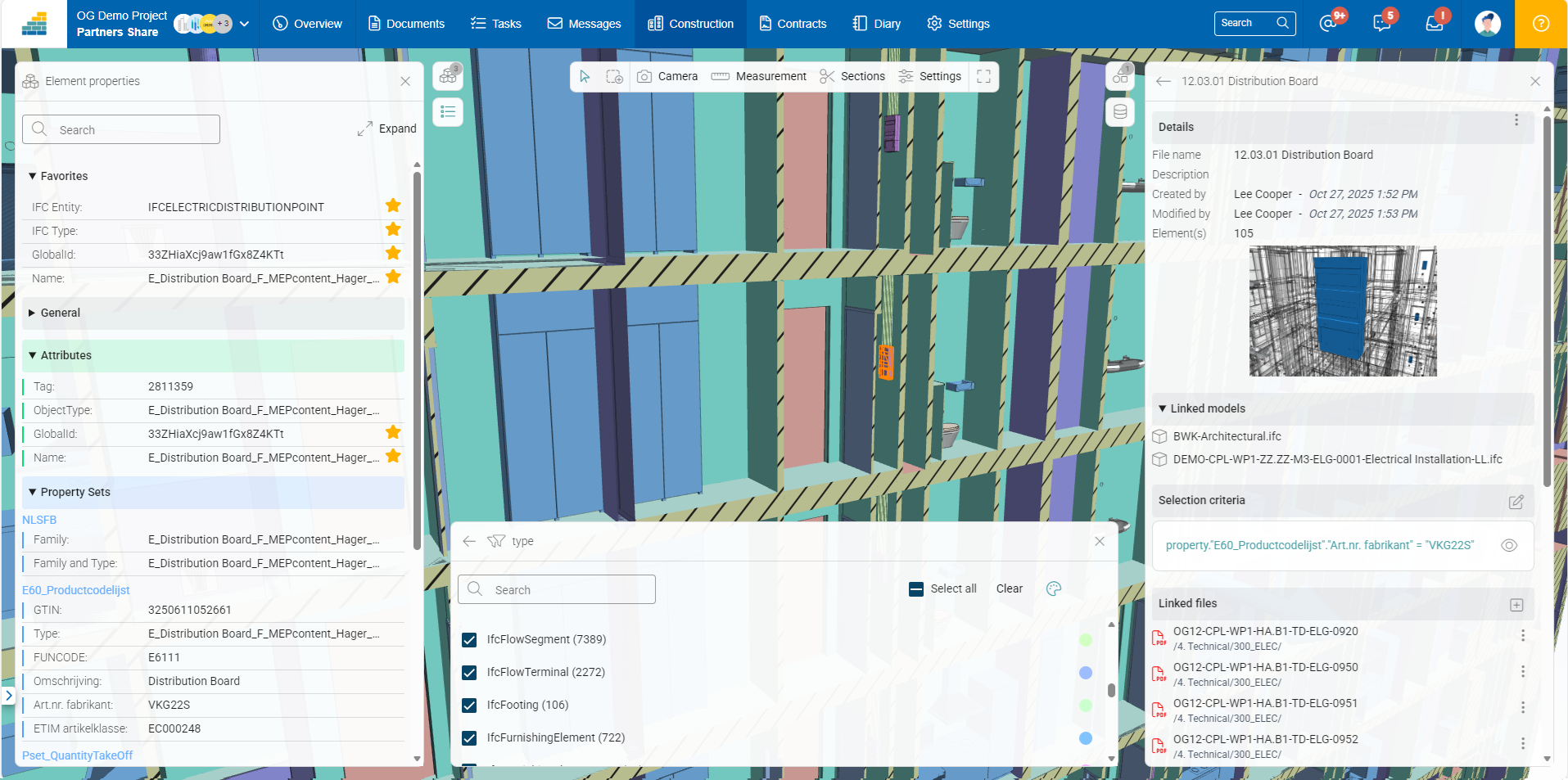
BIM-as-a-Database / BIM Query Language
For experts in the field, Cooperlink's open technology can be used to query the model like a database or to apply certain visualization parameters (e.g., colorization, filtering, etc.).
The main use cases are (non exhaustive):
- Create complex links for the most critical projects
- Manage 4D and 5D BIM driven by external sources
- Quantities extraction
- Dashboards (e.g. using Power BI)
What is your use case?
---
Want to learn more? Contact-us
What is your project?
Talk to an expert
Tell us more about your project and needs. Our experts will answer your questions within 24 hours.

Axel Palmaers
CEO Cooperlink